FREE BUDGET WORKSHEET!

Smart Bird Feeder Camera UNDER $30! (Reg. $80)


This post may contain affiliate links, which means if you click on a link and purchase something, I may earn a small commission (at no additional cost to you.) See my disclosure policy HERE.

FREE Work Planner Sample!

SIGN UP NOW to get a SNEAK PEEK!

I won’t send you any spam, ever. Promise! 

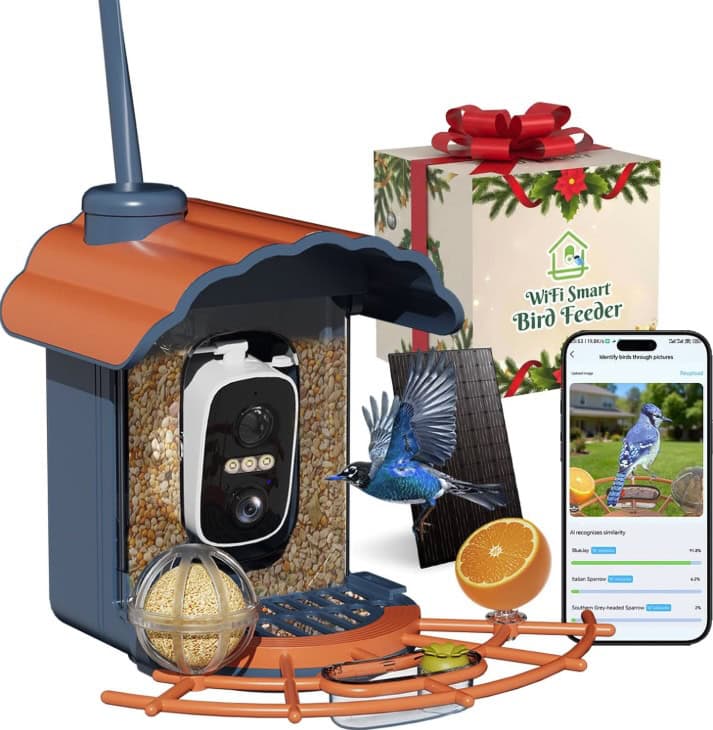
Minikey Smart Bird Feeder with Camera

Smart Bird Feeder Camera

Love bird watching or know someone who does? We found a great Smart Bird Feeder Camera deal on Amazon today that would make a great gift idea for a bird loving friend or family member! 🙂

Solar Powered Smart Bird Feeder with Camera – $49.67 (Reg $80)

  • Use code SBGSL7PJ at checkout
  • Shipping is free with Amazon Prime
  • Makes it $30 shipped!

Minikey Smart Bird Feeder with Camera Outdoor Birdhouse

Solar Powered Smart Bird Feeder with Camera – $56.69 (Reg $100)

  • Use code 5UEZCDRY at checkout
  • Shipping is free with Amazon Prime
  • Makes it $30 shipped!

Want to make your own bird feeder? Go here for our DIY!


Join Amazon Prime for one month free. Watch Over 40,000 Movies for free plus get free shipping on thousands of items!


Pssstt – Check out our storefronts! ⬆️

Join Amazon Prime FREE for 30 days! Watch tons of movies, enjoy fast & free shipping, and more!

Love Amazon? Don’t miss my list of 16 items you should be buying on Amazon.

See more Amazon Deals, and remember when you subscribe and save to 5 or more items in one month, you’ll also save an additional 15% on all of your subscribe and save purchases.

**Remember that pricing on Amazon is subject to change at any time.

Comments

    Leave a Reply

    Your email address will not be published. Required fields are marked *

    • Liza - PPP Team says

      Hi Joe, I’m so sorry the code didn’t work for you. I just tested the code and was able to get it to work now (as of tonight at 8:55 pm EST). If you can try again, I’m pasting the step by step tips for getting the code to work just in case you need them. I hope this helps.

      1) Add the item that is included in the sale to your cart. Click “Proceed to Checkout”
      2) Don’t place your order yet! Scroll down below your saved payment methods, where you will see “Use a gift card, voucher, or promo code.” Click that link.
      3) Scroll down below your entered credit cards. Paste your coupon code where it says “Enter a gift card, voucher, promotional code.” Click the blue button or arrow to apply the code.
      ** IMPORTANT – If there is a promotional balance showing, click the button next to it to take advantage of the savings. (Make sure the button is showing as blue)
      4) Click “Continue”
      Last Step! Double check that your order total is correct. Place your order.

    • Laurie says

      Hi there Jessica! It still seems to be working on our end ~ if on mobile, be sure to click the little arrow after entering the code before clicking continue for the price to drop!