


Do you ever look at friends photos on Instagram or Facebook (or even fancy influencers) and wonder why they all just look a wee bit lighter and brighter than your photos do?
Me. too.
But now we can help. (YAY!) 🙂
For 48 hours only, learn how to EASILY fix your photos with the click of a button (I truly can’t believe how easy it is!)
Right now you can save a whopping 60% on Photo Presets from my friend Nicole at Digi Presets, which is an EASY way to quickly lighten and brighten any photos to share! Use your regular phone camera to take beautiful pictures, then print them out or even send them digitally as Christmas cards to friends and family.
Here’s how to get the best deal for 48 hours only:
- Go HERE and add the Stardust Preset Pack to your cart ($37)
- Use the code PPP to save a whopping 60% off today
- Pay just $14.80 for 1 Preset + 4 Bonus Presets (the lowest price we’ve seen on these!)
If it’s not in your budget to get a professional photographer, Digi Presets are an easy way to edit your photos using only your phone. Instead of spending hours figuring out the right light and exposure, with one simple click your photos magically will be edited (but without too much editing. Phew! You won’t be pale or washed out, just a little softened, brightened and lightened with one simple click.
Looking for ways to easily take better photographs, every single day? I absolutely love these tips Nicole DiGiacobbe from Digi Presets shared with us for you to use as you’re prepping for the holidays! Here are 8 easy ways to take better pictures that anyone can use:
- You don’t need a fancy camera or expensive equipment to take beautiful, professional photos. Nicole has shot amazing pictures for brands like Nordstrom and Pottery Barn kids, all using just her phone. (I love that!)
- Use natural lighting when you can. Shade is best- never shoot in direct harsh sunlight. If shooting outside, position your subjects so that the lighting is even on their face.
- If shooting indoors, turn off any artificial lights (lamps, etc) as these tend to make your photos orange and have uneven shadows. Trust me ~ this one is SO important. I run around the house and turn off any lights any time we take a picture around here! Overhead lights will add shadows to your photos. Go with natural light whenever possible!
- Use string lights and blankets in your photos. Get cozy and squeeze together wrapping your loved ones up in a blanket or have string lights draped around your shoulders! Or sit cozy on a blanket with string lights laid on the floor behind you (This an exception to the artificial light rule). They make for such magical photos!
- Use a small portable tripod and your camera phone self-timer (or remote clicker) from amazon for $20 and take family photos anytime, anywhere! Tip: if you have an apple watch, you can use the camera remote on your watch to take photos remotely. Genius!
- No crazy prints. Shoot in coordinating solid colors. Rich colors and earth tones make for a natural and timeless look. Or take Christmas pajama photos every year and make it a fun tradition!
- Remember not to get hung up on minor details and to enjoy the process! Tell everyone to “laugh” or tell a joke or say something cheesy! If you have a remote clicker hidden in your hand, click away during those in-between and after moments bc those tend to make the most fun and cheerful photos!
- And most importantly, use a preset!! A preset is a professional filter made by a photographer that applies over 20+ unique settings to your photo in the free app called Adobe Lightroom.
So what even is a preset?
To be real honest with you, I didn’t know myself until a few days ago when talking with Nicole. Basically, you add them to the Lightroom App (you can use the FREE version of Lightroom – that’s what I used when trying it out myself!)

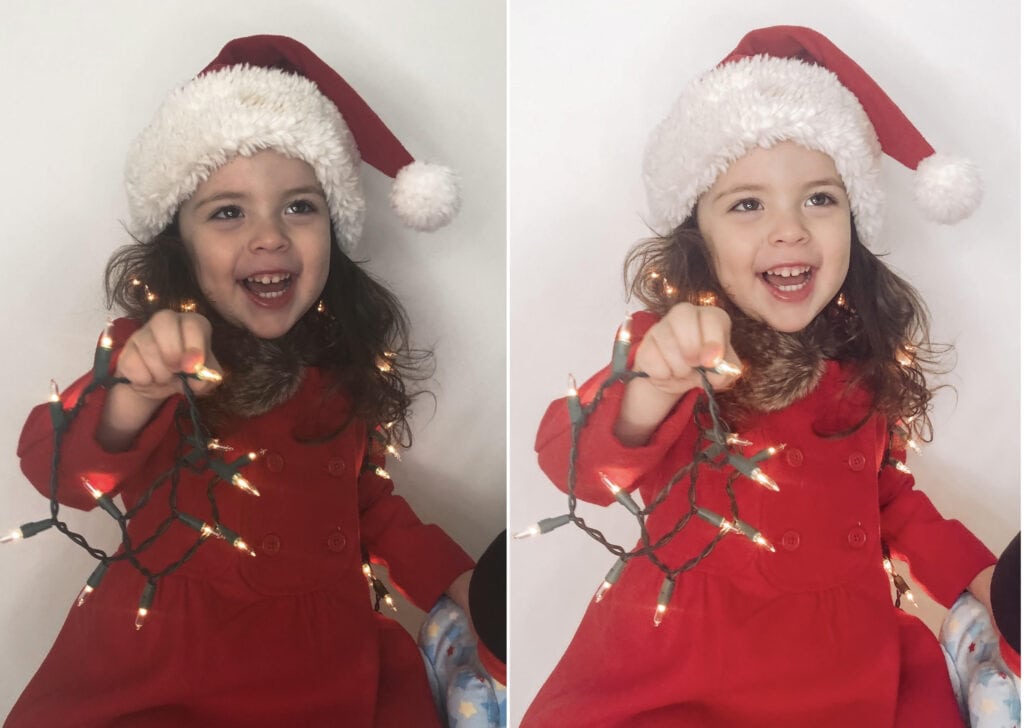
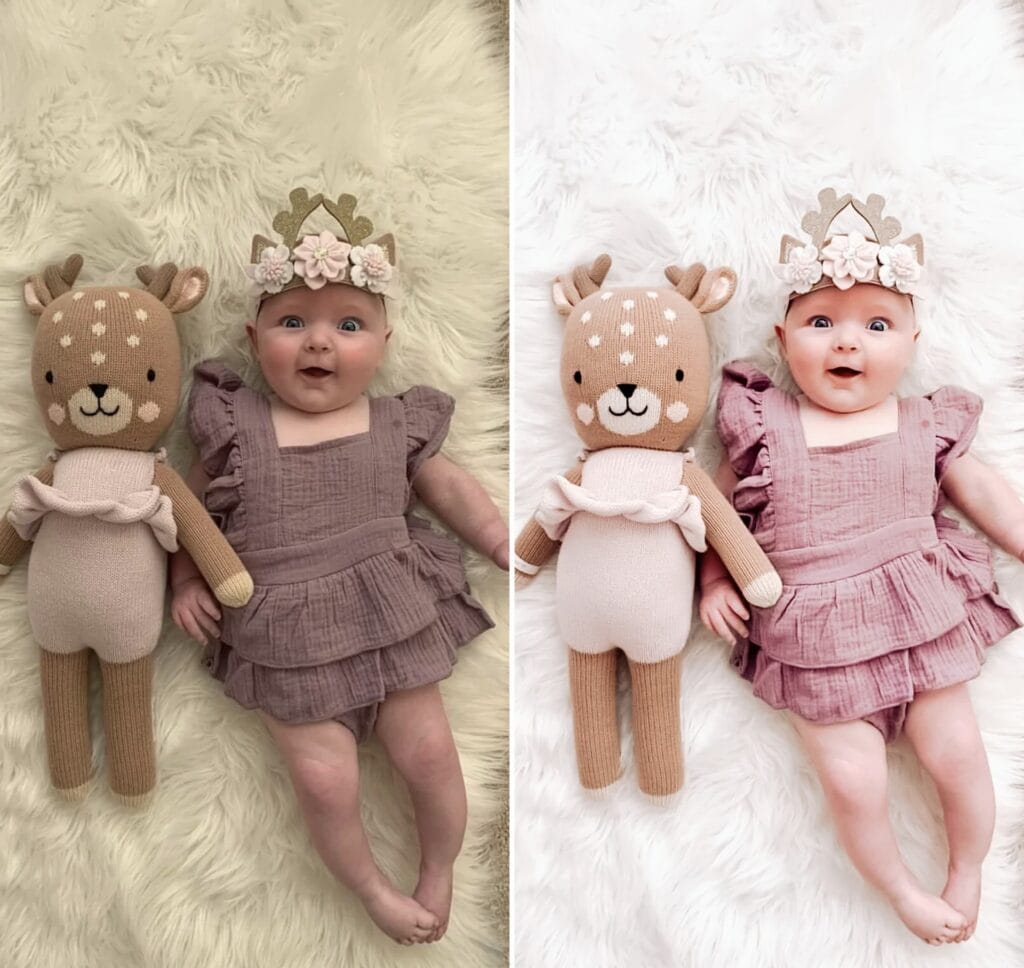
Once you’ve uploaded your “preset” to your phone, you literally put in your photo, click ONE button, and your photos just look a little lighter and brighter – not too much but just enough to give you the perfect photo with very little time involved.
Here’s a peek of the difference ~
before . . .

after . . .


I tried them out myself on a few of our photos, and was pretty impressed with how easy they were to use to use. Head on overHERE to snag 60% off today with the code PPP while this offer lasts ~ I know you’ll love it too!



Leave a Reply